A practical carpet–caster–path method for protecting carpet, sizing a chair mat, and checking that an office chair moves predictably.
The right ergonomic setup should adapt to your body, support frequent movement, and stay comfortable through a full workday.
You can use an office chair on carpet, but the setup has to match the carpet and the way you actually move. Start by measuring the carpet and pad together, checking that the chair’s casters are approved for that floor, and mapping the full area reached by all five casters. If the chair digs in, leaves concentrated tracks, or requires force to move, use a chair mat rated for your carpet thickness and working load rather than choosing by appearance alone.
A mat is not automatically the right fix. A mat that is too light for the carpet can sink, bow, creep, or crack; a replacement caster that has not been approved for your chair and flooring can create a different compatibility problem. The goal is predictable movement with every caster supported throughout your normal work path.
Start With a Carpet–Caster–Path Check

Before buying anything, inspect three parts of the setup:
- Carpet: identify whether it is low, medium, or deep pile, then measure the carpet and pad together to the subfloor.
- Caster: check that every wheel turns and swivels freely, has no visible damage, and is approved by the chair manufacturer for the floor at your workstation.
- Path: observe where all five casters travel when you sit down, approach the keyboard, reach to either side, and leave the desk.
This is a compatibility problem, not just a carpet problem. The OSHA computer workstation guidance recommends a stable five-leg base and casters appropriate for the flooring at the workstation. That means the correct solution depends on the chair, floor, and movement pattern together.
Measure Carpet and Pad Before Choosing a Mat
“Low pile” and “thick carpet” are useful descriptions, but a chair-mat maker may use measured thresholds. Measure from the top of the carpet through the pad to the hard subfloor, then compare that result with the specific mat manufacturer’s rating.
The Deflecto ChairMat Selection Guide describes a simple method: straighten a paper clip, insert it through the carpet and pad until it reaches the subfloor, mark the surface level, then measure that distance. Use an inconspicuous spot, do not force the probe, and stop if you meet unexpected resistance. If the carpet or floor manufacturer gives a different measurement method, follow that instruction.
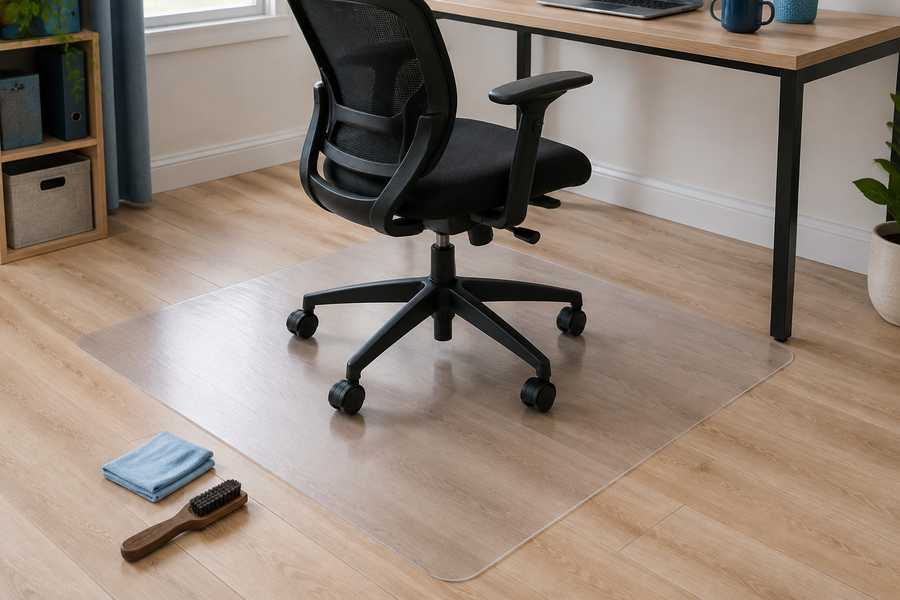
Do not use a hard-floor mat on carpet simply because it is available. Look for a mat explicitly intended for carpet, then confirm its carpet-thickness range, load or use rating, dimensions, edge design, and installation instructions. Carpet mats often use a textured or cleated underside, but the exact backing must still be compatible with your carpet.
Map the Five-Caster Rolling Path

A mat can match the carpet and still be too small. Its useful dimensions are determined by the chair’s movement, not just the desk width.
- Put the chair in the neutral working position.
- Use removable painter’s tape to mark the outer caster positions.
- Roll to the keyboard position, normal side reaches, and the point where you enter or exit the chair.
- Mark the farthest position reached by each caster.
- Measure the full width and depth of that perimeter.
If the front casters travel beneath the desk, include that area. A lipped mat may protect the under-desk zone without placing the full mat under the desk, but only when its shape matches the actual path. Avoid putting a caster near an unsupported edge during normal movement.
Choose the Fix That Matches the Failure
| What you observe | Likely problem to check | Start with | Pass condition |
|---|---|---|---|
| The chair rolls evenly and the carpet shows no unusual change | The current caster–carpet pairing may already be workable | Confirm manufacturer compatibility and continue inspecting the path | All casters rotate and swivel without catching or digging |
| Casters sink, catch, or require repeated force | Carpet depth, padding, caster design, or debris may be increasing resistance | Inspect and clean the casters; evaluate a carpet-rated mat or approved caster | The chair reaches normal work positions with controlled movement |
| A mat bows, cups, cracks, or develops deep caster depressions | The mat may not match carpet thickness, load, or use frequency | Stop using the damaged mat and recheck its published rating | The replacement stays supported and flat during the full movement test |
| A mat moves, curls at an edge, or catches a caster | Backing, installation, size, or carpet compatibility may be wrong | Stop and correct the mismatch; do not tape over a hazardous edge as a permanent fix | The mat stays in position and every transition is controlled |
| One wheel drags while the others roll | Hair, thread, damage, or a loose caster connection | Follow the chair manual for inspection, cleaning, or replacement | All five casters behave consistently |
Install and Test a Carpet Chair Mat
Follow the mat manufacturer’s instructions for unpacking, flattening, orientation, and furniture placement. Do not assume that every mat can be forced flat immediately or placed beneath desk legs. Clean the carpet first, place the correct side down, and position the mat so that every caster remains on the supported surface during normal work.
Then test in increasing order:
- With the chair empty, roll it across the expected path and check the edges.
- Sit in the chair and move into your neutral keyboard position.
- Complete the side reaches you normally make.
- Back out and leave the chair as you would during the workday.
Stop if the mat shifts, a caster falls off an edge, the surface bows sharply, or the chair becomes difficult to control. A person who relies on a mobility device or needs a stable transfer route should also evaluate whether the mat edge or rolling resistance creates a barrier; obtain an individualized accessibility assessment when needed.
Know When the Problem Is the Caster or Chair
A mat cannot repair a damaged wheel, loose caster stem, cracked base, or bent structural part. Remove hair and debris only as directed in the chair’s care instructions, and replace components with parts confirmed for the exact chair model.
OdinLake currently lists a replacement caster set for the O1, O2, and O3 chairs, but the product page does not state that the set is suitable for every carpet type. Do not treat the product name or wheel appearance as proof of floor compatibility. Confirm the chair model, carpet, and intended use with OdinLake support before ordering for this purpose.
Stop using the chair and contact the manufacturer if a caster will not stay seated, a wheel housing is broken, the base is cracked, or movement remains unstable after the floor setup has been corrected.
Inspect the Setup as Conditions Change
Recheck the carpet–caster–path relationship after initial use and whenever rolling resistance or the workstation layout changes. Look beneath the mat as allowed by its care instructions, vacuum according to the carpet manufacturer’s guidance, and inspect for:
- mat movement, curling, bowing, cracks, or deep depressions;
- carpet tracking, concentrated crushing, fraying, or discoloration;
- debris around caster axles;
- wheels that drag, wobble, or no longer swivel consistently; and
- a new desk position that sends a caster beyond the protected area.
Using an office chair directly on carpet can be reasonable when the manufacturer confirms compatibility and the setup passes the movement check. A carpet-rated chair mat is the stronger option when the chair sinks, the carpet shows concentrated wear, or the caster path needs a predictable surface. In either case, measure first and verify the whole five-caster path before making the setup permanent.
Frequently Asked Questions
Can you use an office chair directly on carpet?
Yes, if the chair manufacturer confirms that the casters suit the flooring and the chair moves predictably without digging, catching, or producing unusual carpet change. Test the complete five-caster path rather than assuming all office-chair wheels are carpet compatible.
Do office chairs damage carpet?
Repeated concentrated loads and rolling can change or wear carpet, particularly when the caster, carpet depth, padding, and use pattern are mismatched. A correctly rated chair mat can spread the working surface, but it also needs to match the carpet and load.
Do I need a chair mat on low-pile carpet?
Not automatically. Low-pile carpet may still work differently depending on its pad, construction, caster, load, and frequency of movement. Use the direct setup only after confirming compatibility and checking for controlled rolling and carpet change.
How do I measure carpet for a chair mat?
Measure the combined carpet-and-pad depth to the hard subfloor, not just the visible fibers. One manufacturer method uses a straightened paper clip in an inconspicuous spot, marked at the carpet surface and then measured. Follow the chosen mat maker’s method and thresholds.
What size chair mat do I need for carpet?
Choose a mat that contains the full outer path of all five casters during keyboard work, normal side reaches, and entry or exit. Include the under-desk area if the front casters travel there; a lip is useful only when its shape covers that movement.
Should a chair mat for carpet have spikes or cleats?
Many carpet mats use a textured, studded, or cleated underside, but backing designs and carpet compatibility vary. Select a product specifically rated for your carpet construction and thickness rather than assuming more or sharper cleats are better.
Why does my office chair sink into or struggle to roll on carpet?
Possible contributors include deep or padded carpet, an unsuitable caster, debris around a wheel, a damaged caster, or a mat that is too light for the surface and load. Inspect one variable at a time, then repeat the seated movement test after each correction.