The right ergonomic setup should adapt to your body, support frequent movement, and stay comfortable through a full workday.
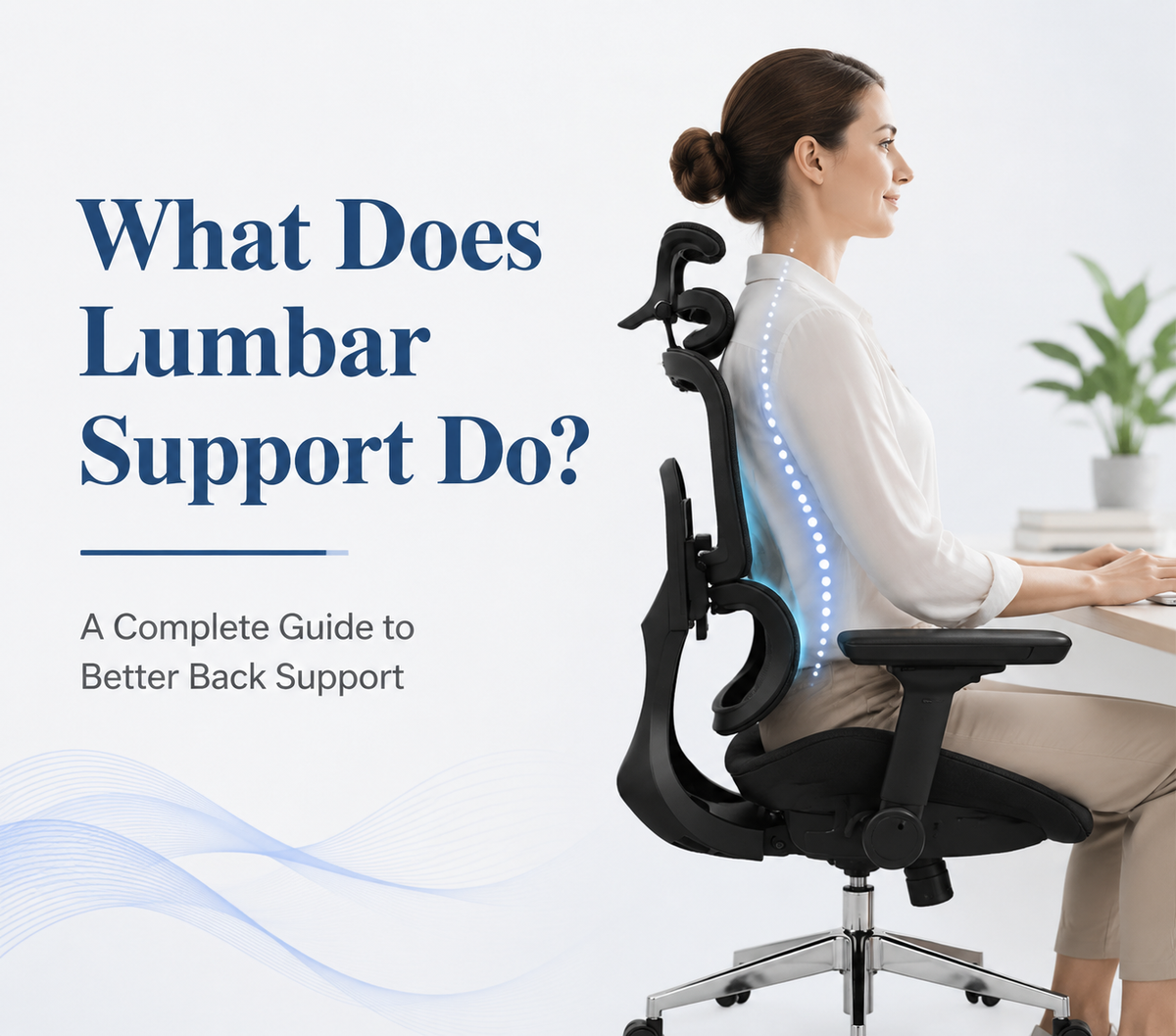
Lumbar support fills the space between your lower back and the chair, helping the backrest follow the natural inward curve of the lumbar spine. When it fits your body, it can make sitting feel more stable and reduce the tendency to slump.
Seat height, seat depth, armrest position, desk height, and regular movement also affect how your back feels. This guide explains where lumbar support should sit, how to adjust it, and what to look for in an office chair.
Quick Answer: What Does Lumbar Support Do?
Lumbar support maintains contact between the chair and the small of your back. It supports the lower spine’s natural inward curve, reduces unsupported gaps, and makes it easier to avoid slouching during long work sessions.
Good support should feel present but not aggressive. It should not force your torso forward or create a hard pressure point.
Can Lumbar Support Improve Lower Back Comfort?
Lumbar support may improve comfort when lower back discomfort is related to prolonged sitting, an unsupported backrest, or slumping. By maintaining contact with the lower back, it can reduce some of the muscular effort needed to hold the torso upright. Research on chair design suggests that enhanced lumbar support may reduce the physical effort required to maintain certain seated positions in certain seated conditions.
Still, lumbar support is not a treatment for every cause of back pain. Evidence for lumbar supports as a standalone solution is mixed, and discomfort may also come from injury, an unsuitable workstation, or limited movement.
For habits beyond chair adjustment, OdinLake’s guide to relieving lower back pain covers movement, posture, and workstation changes. Persistent pain, numbness, tingling, weakness, or worsening symptoms should be evaluated by a healthcare professional.
How Does Lumbar Support Help Your Back?
Lumbar support works by improving contact between your lower back and the backrest. Its effectiveness depends on the shape of the support, its position, and how well the rest of the chair fits your body.

Supports the Natural Curve of the Lower Back
The lumbar spine naturally curves inward. A flat or poorly positioned backrest may leave a gap behind this area, so the muscles and surrounding tissues must do more work to maintain posture. Lumbar support fills that space and allows the lower back to rest against the chair.
OSHA recommends a backrest that follows the spine’s natural curvature and provides adequate lumbar support. Height adjustment also helps position the support correctly in the small of the back.
Reduces Slouching and Pelvic Tilting
Slouching often occurs when the pelvis rolls backward and the lower back loses part of its inward curve. A properly positioned support can limit that collapse by giving the lower back a more stable surface.
When the support sits too low, it may press against the upper pelvis instead of the lumbar region. When it sits too high, it may push into the lower ribs while leaving the actual lumbar curve unsupported.
Reduces Muscle Fatigue During Long Sitting
Lumbar support can reduce some of the work required from the trunk muscles, especially when you sit fully back and the chair fits correctly. Research comparing different sitting designs has found that enhanced lumbar support can reduce lumbar muscle activity and spinal loading under certain conditions.
It does not remove the need to move. Small posture changes, short standing breaks, and brief walks help prevent the same tissues from remaining under one static load all day.
Where Should Lumbar Support Be Positioned?
The support should meet the natural inward curve of your lower back rather than pressing against your tailbone or upper back. The exact position varies because torso length and spinal shape differ between users.
Find the Natural Curve of Your Lower Back
Lumbar support usually sits around the belt-line area. Sit fully against the backrest and find where your waist curves inward most clearly. The center of the support should meet that area without lifting your ribs or pressing into the top of your pelvis.
OSHA recommends positioning the outward curve of the backrest in the small of the back. A height-adjustable design makes this alignment easier for people with different body proportions.
Signs the Support Is Too High or Too Low
The support is probably too low when it presses against the upper pelvis or tailbone while the waist still feels unsupported. You may also feel as though your hips are being pushed forward.
It is probably too high when pressure collects near the lower ribs or makes you lean away from the backrest. Adjust the height before changing the depth. When the location feels correct but the pressure remains uncomfortable, reduce the firmness.
How Firm Should Lumbar Support Feel?
The support should maintain steady contact without forcing an exaggerated arch. You should feel that the gap behind your waist has been filled, but you should not feel pushed toward the front of the seat.
More pressure is not automatically better. The most suitable setting is usually the lowest level that keeps your lower back comfortably supported.
How to Adjust Lumbar Support Correctly
Lumbar support should not be the first chair feature you adjust. Begin with the seat so your body can reach the backrest naturally.
Adjust the Seat Height and Depth First
Set the seat height so your feet rest flat on the floor or a footrest and your thighs feel supported. Then adjust the depth so you can sit fully back without the seat edge pressing into the backs of your knees.
An overly deep seat can prevent shorter users from reaching the lumbar support. An adjustable seat pan helps different body sizes maintain back contact while supporting most of the thighs.
Align the Support With Your Lower Back
Move the lumbar support until it fills the inward curve of your lower back. Sit normally instead of exaggerating an upright position. It should remain correctly placed when you relax your shoulders and put your hands on the keyboard.
For a complete setup sequence, follow this ergonomic chair adjustment guide, which also covers seat depth, recline, armrests, and headrest position.
Increase the Support Gradually
Begin with a low depth or tension setting. Increase it one step at a time until the gap behind your waist is filled. Test the setting while typing, reading, and leaning back slightly.
Keep each setting for several minutes before changing it again. A level that feels comfortable at first may become too firm during a longer work session.
What Are the Main Types of Lumbar Support?
Different lumbar support systems offer different levels of fit and movement. The best option depends on your body proportions, working habits, and preference for manual adjustment.
|
Lumbar Support Type |
Main Feature |
Best For |
|
Fixed lumbar support |
Preset backrest curve |
Users whose body shape matches the chair |
|
Adjustable lumbar support |
Changes in height, depth, or tension |
Users who want manual control |
|
Dynamic lumbar support |
Responds to changes in sitting position |
Long sessions and frequent movement |
|
Lumbar pillow |
Adds support to an existing chair |
Temporary or budget-friendly improvement |
Fixed support depends heavily on body fit. Adjustable support offers more control, while dynamic support maintains contact as the body shifts. A removable pillow can improve a basic chair, provided it does not take up too much seat depth.
The OdinLake L3 FlexBreath® ergonomic chair is an example of dynamic support. Its Responsive Backrest uses a split-back structure with dynamic tension sensing. The upper section flexes with upper-body movement, while the lumbar section glides with the lower back as the user shifts or reclines. This design suits people who change positions frequently and prefer support that does not require repeated manual adjustment.
How to Choose an Office Chair With Good Lumbar Support
Do not judge lumbar support only by how large or prominent it looks. A good chair should allow the support, seat, and backrest to work together.
Choose the Right Type of Lumbar Support
Match the support to your sitting habits. A fixed curve may be sufficient for shorter sessions when it fits your body. An office chair with adjustable lumbar support suits users who want precise control over the support height, depth, or tension.
Do not choose by pad size alone. A large lumbar pad can still feel uncomfortable when it sits too high or applies excessive pressure.
Test the Support in Different Positions
Sit upright, type, lean back slightly, and shift from side to side. The support should remain in the lumbar area without digging into one point.
Also check whether the backrest allows you to move. OSHA recommends a backrest that supports the user across different seated postures and provides an adjustable recline rather than forcing one rigid position.
Consider the Overall Chair Fit
Your feet should remain supported while your back stays against the backrest. The armrests should allow your shoulders to relax, and the desk should not force you to lean forward to reach the keyboard.
When choosing an ergonomic desk with chair setup, make sure the desk height allows your shoulders to stay relaxed and your forearms to remain roughly level while typing.
For users who prefer more manual control, the OdinLake O2 Ergo MAX 747 offers a different approach from the L3. Its three-section independent backrest provides separate support for the cervical, thoracic, and lumbar regions, while the dynamic lumbar section helps maintain lower-back contact as the user changes position. Seat-depth adjustment also helps users sit fully against the backrest instead of perching near the front of the seat.

Common Lumbar Support Mistakes
Even a well-designed lumbar support can feel uncomfortable when the chair is adjusted incorrectly.
- Placing it too low: Support against the pelvis or tailbone misses the lumbar curve.
- Setting it too high: Pressure near the ribs leaves the lower back unsupported.
- Using excessive depth: Too much pressure can push the torso forward.
- Adjusting the lumbar area before the seat: Incorrect seat height or depth may keep you from reaching the backrest.
- Staying in one position all day: Support may improve sitting comfort but does not replace movement.
- Expecting the chair to treat pain: Lumbar support may improve comfort, but it is not medical treatment.
FAQs About Lumbar Support
Can Too Much Lumbar Support Cause Discomfort?
Yes. Excessive depth or firmness can overarch the lower back, concentrate pressure, or push you away from the backrest. Reduce the setting if you feel pinching or forced arching.
Do Lumbar Support Pillows Really Work?
A lumbar pillow can fill the gap behind the lower back when a chair lacks built-in support. Choose moderate thickness and secure it so it does not slide. OSHA also suggests using a rolled towel or removable cushion as a temporary source of support.
Is Dynamic Lumbar Support Better Than Fixed Support?
Not for everyone. Dynamic support is useful when you change positions often because it can continue following the lower back. Fixed support can work well when its shape and location already match your body.
Should You Use Lumbar Support All Day?
You can use lumbar support throughout the workday, but you should still change your recline angle, stand periodically, and take short movement breaks.
Can You Add Lumbar Support to Any Office Chair?
A pillow or rolled towel can work with many chairs, but the result depends on seat depth and backrest shape. When the added support pushes you off the seat or prevents your feet from remaining stable, the chair may not fit your body.
Conclusion
Lumbar support fills the space behind the lower back, helps maintain the spine’s natural inward curve, and can make prolonged sitting feel less demanding. The best support feels steady without being forceful and remains properly positioned while you work.
Adjust the seat before the lumbar area, test the chair in several positions, and choose a support style that matches how you sit. Most importantly, pair a supportive chair with regular movement. Comfort depends on the complete workstation and your daily habits, not one feature alone.