A non-destructive method for clearing hair and grit from office chair casters, checking each wheel, and deciding when cleaning should stop.
The right ergonomic setup should adapt to your body, support frequent movement, and stay comfortable through a full workday.
To clean office chair wheels, unload and stabilize the chair, remove loose grit first, pull visible hair and thread from the axle gaps, wipe the tread and housing with a barely damp cloth, dry every caster, and test each wheel before sitting down. Routine cleaning usually does not require removing or opening the casters. Do not soak them, force a tool into a bearing, pry apart a sealed wheel, or add lubricant unless the instructions for your exact chair or caster say to do so.
This method is for accessible dirt on common office chair casters—not a model-specific repair. It gives you a clear finish line: each wheel turns without catching at the same point, the caster swivels normally, and the empty chair rolls without one wheel dragging. A cracked, loose, bent, or persistently grinding caster has moved beyond cleaning.
Start With the Obstruction, Not a Cleaner
Look at all the wheels before reaching for water. What is stopping the caster determines the safest first move.
| What you can see or feel | First response | Finished signal | Stop cleaning when |
|---|---|---|---|
| Loose dust, crumbs, or carpet fibers on the tread | Vacuum and use a soft brush while rotating the wheel | The tread is visibly clear and no longer sheds debris | The tread is split, flat-spotted, or separating |
| Hair or thread wrapped in the wheel gap | Loosen short sections with fine tweezers or a small blunt hook | No visible band remains and the wheel turns without a repeating catch | The bundle is behind a sealed cover or requires prying, flame, or a blade near the axle |
| Sticky residue on the rolling surface | Use the chair maker’s approved cleaner on a cloth; start with the least moisture | The tread is dry, clean, and not tacky | The residue has softened, swollen, discolored, or damaged the wheel material |
| Grinding, side-to-side play, or a loose stem | Remove surface debris only, then inspect without loading the chair | No abnormal movement remains after cleaning | Grinding, wobble, looseness, or tilt remains |
Industry caster inspection guidance treats caught foreign material, cracks, deformation, and axle looseness as different conditions: debris should be removed, while damaged or loose components require replacement or service. That distinction keeps a cleaning job from turning into an improvised repair.
Set Up the Chair So It Cannot Roll While You Work
Gather a vacuum with a crevice or soft brush attachment, a soft dry brush, fine tweezers or a small blunt hook, two clean microfiber cloths, a flashlight, gloves, and a towel or flattened cardboard to protect the chair and floor.
- Empty the chair. Remove bags, cushions, and loose accessories. Do not clean the wheels while someone is sitting in the chair.
- Clear the work area. Move cables, small objects, pets, and anything that could be trapped beneath the chair.
- Check the manual before tipping the chair. Follow the model’s maintenance position when one is specified. If the chair is heavy, awkward, or difficult for you to control, ask another person to help rather than catching a falling chair.
- Support the chair on a protected surface. Keep the headrest, arm pads, control levers, and upholstery from bearing weight unless the manual permits that position. The chair must be stable before your hands go near the base.
- Put on gloves and inspect all five base legs. Stop immediately if you see a cracked base, bent caster stem, separated tread, or a wheel that is partly out of its socket.
Do not work under a chair that can fall or roll. If safe access requires removing a caster, use the exact chair manual or the manufacturer’s support process; stem, threaded, and model-specific mounts do not all release the same way.
Clear Dry Debris Before Touching the Axle Gap
Start with the least invasive pass. Hold the vacuum nozzle close to—but not pressed against—the wheel and rotate the wheel slowly by hand. Follow with a soft brush to lift grit from the tread, the fork or housing, and the accessible space beside the wheel.
Work from the outside toward the gap so you remove debris instead of packing it farther inward. If the wheel stops at the same point on every turn, note that location. A repeating catch often tells you where to look during the hair-removal pass.
Expected result: loose dust and fibers are gone, the tread is visible, and you can see whether the remaining obstruction is wrapped hair, sticky residue, or a damaged part. If the wheel will not turn by hand, do not force it; clear only what is accessible and move to the stop-or-replace decision below.
Work Tangled Hair Out in Short Sections
Hair usually collects where the wheel meets its housing. Shine the flashlight across that gap, then rotate the wheel until an exposed loop appears.
- Grip the exposed loop with fine tweezers, or slide a small blunt hook beneath it.
- Pull outward a little at a time while turning the wheel backward. The goal is to unwind the strand, not drive a tool toward the axle.
- Release the strand when resistance increases, rotate the wheel, and start from another visible section.
- Vacuum the freed hair before it can wrap around another caster.
- Repeat until no visible band remains and the wheel passes the former catch point without stopping.
Do not burn hair off, pour a hair-dissolving chemical into the caster, or force a knife between the wheel and housing. Heat, solvent, and sharp tools can damage plastic, finishes, seals, or your hands. If a compacted band cannot be reached with a blunt tool, use the model-specific service route or replace the caster rather than prying it apart.
Wipe the Tread and Housing Without Flooding the Caster
Use a dry microfiber cloth first. For residue that remains, check the chair or caster care instructions. When those instructions permit a damp wipe, wet the cloth and wring it out thoroughly before touching the wheel. Apply any approved cleaner to the cloth—not directly to the caster.
Rotate the wheel as you wipe the complete tread, then clean the accessible exterior of the housing and stem area. Keep liquid out of the axle gap, bearing, stem socket, and any seam you cannot dry. Use a second cloth to remove moisture and cleaner residue.
Do not rinse or soak the caster just because it can be removed from the chair. A wheel may contain metal, lubricant, a sealed bearing, or material-specific finishes that are not visible from the outside. If the model instructions do not identify a compatible cleaner, stop at a dry or barely damp water-only wipe and ask the manufacturer about the residue.
Use a Two-Stage Roll Check
Cleaning is not complete until you verify the result. Wait until the tread, housing, stem area, chair base, and floor are dry.
Stage 1: check each wheel off the floor
Rotate the wheel through several complete turns and swivel the caster through its accessible range. You are looking for consistent movement—not a particular number of seconds of free spin. Different caster designs will not coast for the same duration.
A cleaned wheel should pass the former obstruction without a repeated catch. Stop if you feel grinding, see side-to-side axle movement, or find a stem that shifts in the chair base.
Stage 2: roll the empty chair on a clean, flat surface
Return the chair upright using the model-approved method. With nobody seated, guide it forward, backward, and through a gentle turn. Watch each caster as it changes direction. One wheel should not skid sideways, remain turned while the others roll, or leave new residue on the floor.
If the empty chair rolls normally and no damaged part is visible, the cleaning task is complete. If one caster still drags, isolate that wheel and repeat only the dry-debris and visible-hair passes. Persistent binding after a second check is a replacement or support issue, not a reason to use more force or cleaner.
When Cleaning Is No Longer Enough

Stop using the chair and follow the current manual or support path when you find:
- a crack, split, missing piece, or separated tread;
- a bent stem, damaged base socket, or caster that will not stay seated;
- side-to-side wheel play, a visibly loose axle, or a caster that tilts under an empty-chair check;
- grinding, scraping, or a repeating hard stop after accessible debris is gone;
- a wheel that requires unapproved disassembly, drilling, heating, or modification to reach the obstruction.
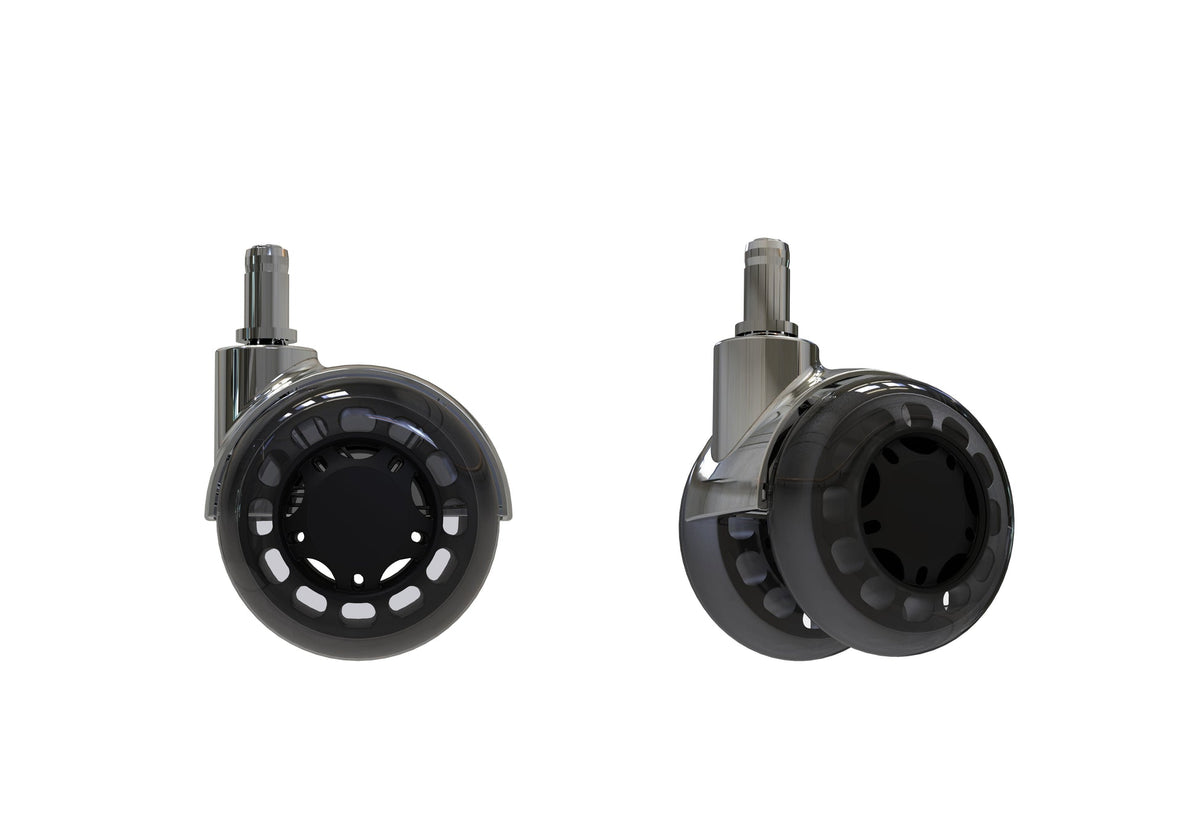
For a separate replacement task, use OdinLake’s office chair wheel replacement guide. OdinLake also lists a replacement caster set for O1, O2, and O3; that listing does not establish compatibility with another model. If your attachment type or part number is unclear, confirm it with OdinLake customer support before ordering or removing the existing caster.
Keep the Next Cleanup Smaller
Use condition-based maintenance instead of an arbitrary calendar. Vacuum or pick up loose hair and thread from the floor before the chair rolls over it. During normal floor cleaning, glance at the wheel gaps and remove an exposed strand before it becomes a compacted band.
Clean again when a wheel develops a visible buildup, a repeating catch, or noticeably different movement from the others. Address sticky floor spills promptly so the tread does not carry residue into the housing. These small checks are more useful than repeatedly washing a caster that is already clean.
Frequently Asked Questions
How do you get hair out of office chair wheels?
Stabilize the unloaded chair, rotate the wheel until you can see an exposed loop, then use fine tweezers or a small blunt hook to pull the hair outward in short sections while turning the wheel backward. Vacuum each freed strand. Stop if the hair is behind a sealed cover or can be reached only by prying, burning, or pushing a blade toward the axle.
Do I have to remove office chair wheels to clean them?
No. Loose debris, accessible hair, and surface residue can usually be handled with the caster installed. Remove a caster only when the exact chair instructions identify the attachment method and authorize removal for maintenance.
Can I wash office chair wheels with water?
Do not soak or rinse a caster unless its manufacturer specifically permits it. Use a dry cloth first, then a thoroughly wrung-out damp cloth when the care instructions allow one, and keep moisture away from axle gaps, bearings, seams, and the stem socket.
Should I lubricate office chair wheels after cleaning?
Only when the instructions for the exact caster specify the lubricant, location, and amount. Caster materials and factory lubricants differ, and an improvised spray can be incompatible or collect more debris. If a dry, clean wheel still binds or grinds, use the support or replacement path instead.
Why do my chair wheels still drag after cleaning?
A hidden obstruction may remain, but persistent drag can also come from a damaged tread, loose axle, bent stem, unsuitable floor contact, or a worn internal part. Repeat the visible-debris check once. If the wheel still catches, do not force or dismantle it without model-specific instructions.
How often should I clean office chair wheels?
Clean them when you see hair or grit, feel a repeating catch, or notice one caster moving differently from the others. Homes with pets, long hair, carpet fibers, or frequent floor debris may need more frequent checks, but there is no single schedule that fits every wheel, floor, and room.