A control-identification method for finding out what an under-seat knob does, verifying tilt tension, and making small, model-safe adjustments.
The right ergonomic setup should adapt to your body, support frequent movement, and stay comfortable through a full workday.
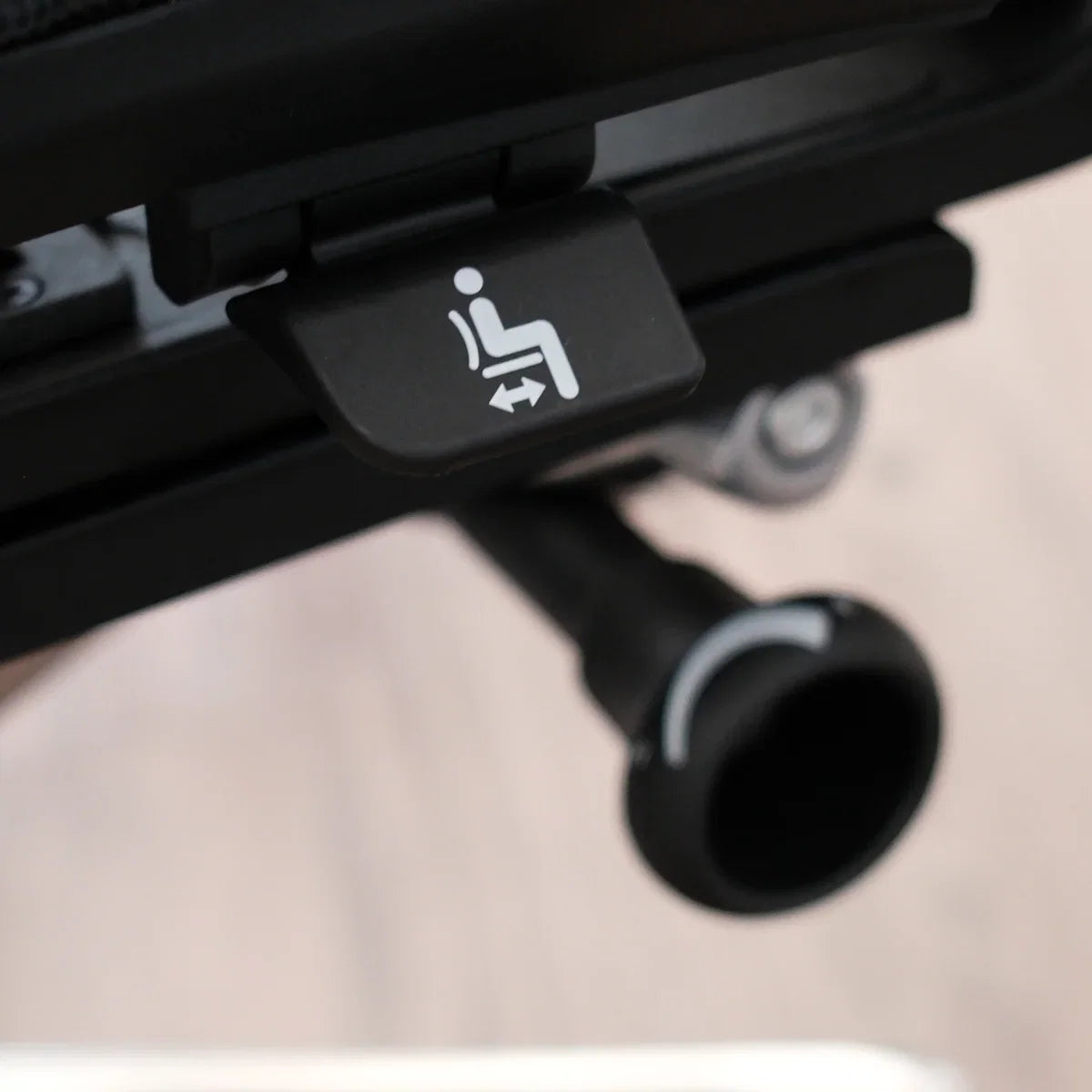
The knob under an office chair is often the tilt-tension control: it changes how much effort the chair requires when you lean back. But “often” matters. Depending on the model and the knob's location, it may instead adjust lumbar depth, arm width, or another feature. Identify the control from the current manual before turning it.
Tilt tension is also different from tilt lock and seat height. Tension changes recline resistance; a lock limits or holds the recline position; a height control operates the chair's gas lift. A reliable way to identify an unknown control is to match its location, nearby symbol, and observable effect rather than guessing from shape alone.
Use Location, Motion, and Feedback to Identify the Knob
Start with the chair unoccupied on a flat floor. Photograph the control's starting position, find the model label, and open the current model manual. Then use this three-part check:
- Location: note whether the knob is at the front-center under the seat, along one side, behind the backrest, or beneath an arm support.
- Motion: determine whether it only rotates or also pulls, pushes, or slides. Do not force a control that resists normal hand pressure.
- Feedback: after one small manual-approved change, sit back down and test only the function you expect. Return the control to its marked start if the expected change does not occur.
The control is identified only when the location and motion match the documentation and the expected function changes. If any one of those signals conflicts, stop and verify the model rather than continuing to turn the knob.
Distinguish Tilt Tension From Nearby Chair Controls

This table is an identification aid, not a substitute for the chair manual. Control layouts and directions vary by manufacturer and model.
| Control you find | What it may control | Observable test | What it is not |
|---|---|---|---|
| A large rotating knob under the seat, often near the center or front | Tilt or recline resistance on many chairs | With tilt unlocked, a small documented adjustment changes the effort needed to recline | It does not normally raise or lower the seat |
| A lever or paddle beside the seat | Seat height, tilt lock, seat depth, or another model-specific function | The symbol and manual identify the motion and expected result | A lever is not automatically a tension control |
| A knob on or behind the backrest | Lumbar depth or back-support firmness on some chairs | The support contact changes without changing recline effort | It may not affect the tilt mechanism |
| A knob beneath an arm support | Arm width or arm-position retention on some chairs | The arm support can be repositioned and secured as documented | Its location does not indicate a recline function |
| A round under-seat control with no readable symbol or manual match | Unknown | No safe conclusion yet | Do not label it by appearance alone |
For example, the current OdinLake assembly and product-guide page provides separate manuals for current chair models. The O1, O2, and O3 manuals identify a back-tilt tension control near the underside of the seat. That model-scoped documentation supports those chairs; it does not establish the function of every round control on every office chair.
Tilt Tension, Tilt Lock, and Seat Height Do Different Jobs
- Tilt tension: changes the resistance you feel while reclining. It does not choose a fixed recline angle by itself.
- Tilt lock: permits, limits, or holds recline positions according to the chair design. It may be a separate lever or share a control with another function.
- Seat height: raises or lowers the seat through the gas-lift control. A chair that sinks after you release the height control has a different problem from a chair that reclines too easily.
If the backrest will not move, confirm that the tilt lock is released before concluding that the tension knob is too tight. If the seat itself drops vertically, adjusting tilt tension will not repair it. Keeping these symptoms separate prevents an unrelated control from being overadjusted.
Adjust a Confirmed Tilt-Tension Knob and Test the Result
Only continue after the current manual confirms the control and direction. Keep fingers outside the moving mechanism, never reach under the seat while actively rocking, and use normal hand pressure only.
- Set a baseline. Unlock the tilt if the manual requires it, sit centered with your feet supported, and recline once. Note whether the chair drops back too readily, resists movement, or moves with controlled effort.
- Mark the start. Place a removable piece of painter's tape on the knob or take a close photo. The mark gives you a known return point.
- Make one small change while the chair is still. Turn only in the direction and amount specified for the model. If the manual gives no increment, use a conservative partial turn rather than spinning the control repeatedly.
- Run test cycle one. Sit back down, unlock the tilt if needed, and recline once without bouncing. The expected result is a noticeable but controlled change in resistance.
- Fine-tune once. Leave the chair, make one more small change if necessary, then repeat the same movement. Stop when the backrest follows deliberate pressure without dropping away or preventing the movement you intend.
Do not use body weight alone to decide which way to turn. Adjustment direction and the feel of the mechanism can vary by chair, and nearby controls may serve a different function. Follow the exact operating guide for the model in front of you, begin from a marked position, and stop at a firm limit rather than applying tools or extra leverage.
Read the Result Instead of Chasing a Number
Tilt-tension knobs generally do not provide a universal numerical setting. Use an observable task result:
- The chair stays predictable when you begin to lean back.
- You can recline deliberately without a sudden drop.
- You do not have to strain or push sharply to start the movement.
- The backrest returns as the chair is designed to when you come forward.
- The setting still works during your normal desk task, not only during a single test lean.
Height, body mass, preferred movement, and the chair mechanism can all change how the same resistance feels. That makes a feedback-led test more useful than copying another person's turn count. Recheck the setting after another regular work period only if the motion feels different in normal use.
If the Knob Seems to Do Nothing, Check the Setup
- Confirm the model and control. A lumbar or arm-width knob will not change recline resistance.
- Release the correct lock. A locked backrest can hide the effect of a valid tension adjustment.
- Return to the marked start and repeat one documented change. Test the same recline movement so the comparison is meaningful.
- Check for a normal operating range. If the knob reaches a firm stop, do not apply tools or extra leverage. The absence of a quick change does not justify forcing the mechanism.
Stop using the chair and contact its manufacturer if the knob spins freely without normal resistance, detaches, produces grinding or metal debris, or accompanies a cracked, bent, loose, or suddenly unstable seat mechanism. Do not open the control housing, drill the mechanism, or disassemble the gas cylinder. OdinLake owners can use the current model guide on the assembly page and contact support when the control behavior differs from the manual. For the rest of the setup sequence, see how to adjust an ergonomic chair.
Frequently Asked Questions
What does the knob under my office chair do?
It is usually a tilt-tension control that changes how much resistance you feel when reclining. Because some chairs use knobs for lumbar depth, arm width, or other functions, confirm the location and symbol in the current model manual before adjusting it.
Which way should I turn an office chair tension knob?
Use the direction in the manual for your exact chair. Rotation is not universal: some manufacturers document clockwise for more tension, while other models use counterclockwise for more tension. Mark the starting position and make one small documented change at a time.
What is the difference between tilt tension and tilt lock?
Tilt tension changes the effort required to recline. Tilt lock permits, limits, or holds the recline position according to the chair's mechanism. A chair can have both controls, and the lock may need to be released before a tension change becomes noticeable.
Why is my office chair tension knob not working?
First confirm that you have the correct knob and that the tilt is unlocked. Return to your marked starting point, follow the model manual, and test the same recline movement after one small change. Stop and contact the manufacturer if the knob free-spins, detaches, grinds, or the chair becomes unstable.
How tight should office chair tilt tension be?
There is no universal turn count. A useful setting lets you start and control recline without a sudden drop or excessive pushing, while allowing the mechanism to return as designed. Use your normal task as the final test rather than matching another person's setting.
Should I adjust tilt tension while sitting in the chair?
Follow the model manual. As a conservative method, observe the recline while seated, then stop moving and leave the seat before reaching under it to make the adjustment. Keep hands away from moving and pinch areas, and never turn the control while actively rocking.
Can a knob under an office chair control something other than recline?
Yes. Depending on its position and the chair design, a knob can adjust lumbar depth, arm width, or another feature. Location, control symbol, manual instructions, and the observable result should all agree before you identify it.