A practical way to make a standing desk frame less visible without covering moving columns, sacrificing legroom, trapping cables, or blocking service access.
The right ergonomic setup should adapt to your body, support frequent movement, and stay comfortable through a full workday.
Quick answer: The least intrusive way to hide standing desk legs is to change what the frame is seen against, change the main sightline, or place a compatible panel or freestanding screen where it cannot enter the desk’s travel path. Do not wrap telescoping columns, build a tight shell around the frame, or let furniture touch the desk in an attempt to disguise or brace it.
A height-adjustable desk is not a fixed console table. Its top, frame, cables, and sometimes accessories occupy different positions as the desk moves. A concealment idea therefore succeeds only when the desk can travel from its lowest to highest position without contact, the user can sit and stand without losing knee or foot room, and controls, plugs, fasteners, and service points remain accessible.
Start With the View You Actually Want to Hide
Before buying a panel or planning a decorative cover, stand where the desk is most often seen. That may be the room entrance, a sofa, the background of a video call, or the visitor side of the desk. Take one photo from that position with the desk low and another with it high.
Now identify what is visually distracting:
- the vertical lifting columns;
- the horizontal feet on the floor;
- the crossbar or equipment below the top;
- cables running down to the outlet; or
- the open space beneath the desk.
These are different problems. A modesty panel can screen the underside from the visitor side but will not hide the feet from a side view. A low-contrast wall can make columns less prominent without covering them. Cable routing may remove most of the visual clutter even when the metal frame remains visible.
Trying to hide every side usually adds more material, creates more interference points, and makes the desk harder to service. Solve the important view first.
Map What Stays Still, What Moves, and What Must Stay Open
Lower the desk, remove fragile items from the edges, and read the desk’s current manual before attaching anything. Then examine the desk as four overlapping areas. This map is more useful than measuring the legs alone.
| Area | What belongs in it | What a concealment method must do |
|---|---|---|
| Floor footprint | Feet, glides or approved casters, and the floor immediately around them | Leave the desk fully supported and keep every foot visible enough to inspect |
| Moving envelope | Every position occupied by the desktop, moving frame, columns, accessories, and cable loops from minimum to maximum height | Stay completely outside it unless the item is approved for that desk and moves with the intended mounting point |
| User space | Knees, feet, chair, footrest, standing position, and normal approach to the desk | Preserve comfortable sitting, standing, turning, and chair movement |
| Access space | Handset, plugs, power equipment, fasteners, labels, reset points, and parts named in the manual | Remain reachable for normal use, inspection, and support |
The moving envelope is not just the gap above the desktop. Watch the rear edge, under-desk components, monitor arms, cable loops, and anything that projects from the frame. A screen that clears the desktop at sitting height may still be struck by a monitor arm or taut cable near standing height.
Keep the user space open as well. OSHA’s computer-workstation guidance recommends adequate clearance for the legs and feet and warns against storing items under the work surface when they restrict movement. A decorative treatment should not force the chair farther from the keyboard or make the user twist around a panel.
Choose the Lowest-Interference Method
Use the first method that solves the important sightline. Combining several treatments rarely makes the desk function better.
Reduce contrast instead of covering the frame
This is the safest starting point because it changes the visual background rather than the desk. A dark frame appears quieter against a deeper wall color, dark rug, or shadowed backdrop; a light frame tends to recede against pale walls and flooring. The colors do not need to match exactly. Similar lightness and lower contrast are usually enough to make the frame less dominant.
Do not paint, vinyl-wrap, or coat the desk unless the manufacturer expressly allows the material and application. A room-level color change is reversible and does not cover joints, labels, damage, or moving column surfaces.
Change the sightline
Rotating the desk or moving it farther from the room’s main axis can place one column behind the other from the important view. A chair, plant, or independent storage piece may work as visual foreground from a distance, provided it does not touch the desk or narrow a walkway.
Recheck windows, screen glare, outlets, doors, and chair clearance before moving the workstation. A visually cleaner angle is not an improvement if it introduces a taut power cord or blocks circulation.
Use a model-compatible modesty or privacy panel
A modesty panel is a panel below a desktop that screens the open area from the opposite side. For a standing desk, a panel intended for the exact desk or mounting method is preferable to adapting a fixed-desk panel. A desk-mounted panel travels with the top, but its brackets, depth, weight, and mounting location still have to clear the frame, controls, knees, and cables.
Confirm all of the following before installation:
- the desk manufacturer permits the accessory and mounting method;
- the desktop material and thickness are compatible with the supplied hardware;
- the panel does not cover the handset, control box, ventilation, labels, or service fasteners;
- the lower edge remains clear of knees and feet in every normal seated position; and
- the total accessory load remains within the desk’s documented limits.
Do not drill because a generic panel includes screws. The safe mounting location depends on the actual desktop and the components underneath it.
Place a freestanding screen behind the desk
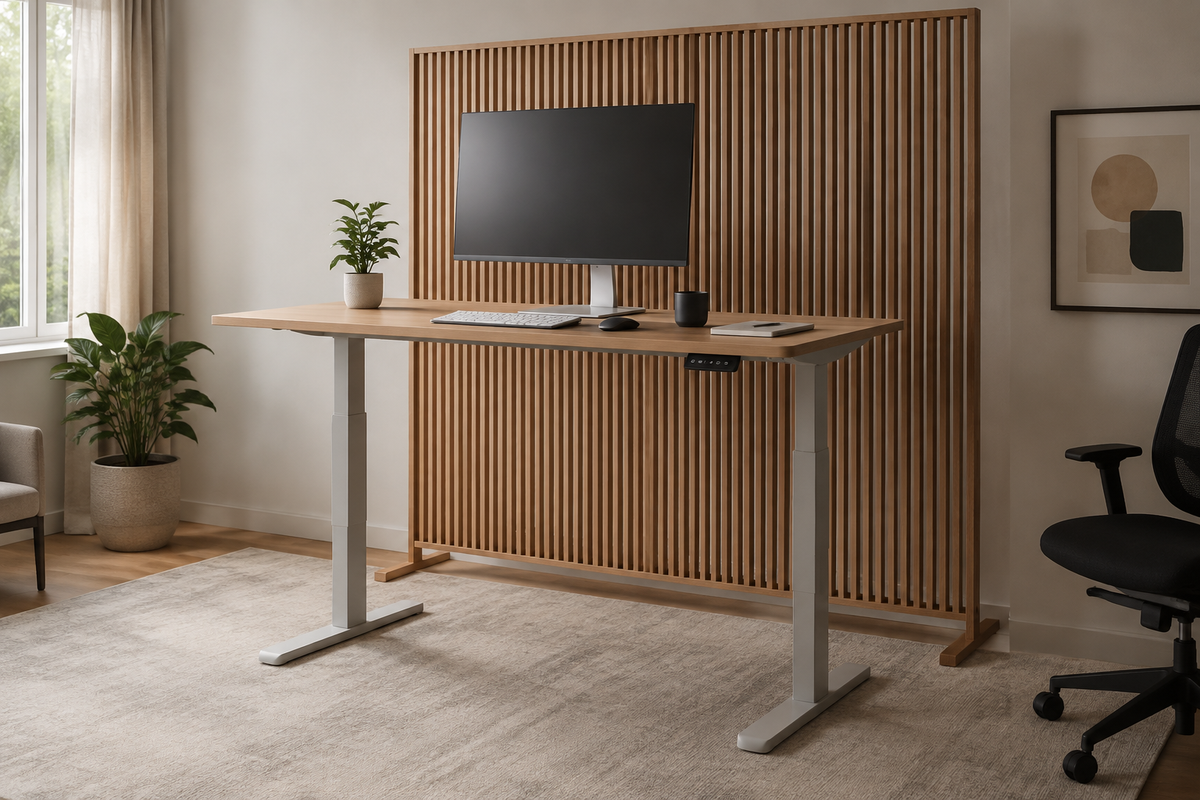
A stable freestanding screen can hide the rear view without becoming part of the desk. It works best when the desk faces into the room and the unwanted view is from behind. The screen must stand beyond the full moving envelope, not just behind the desktop at one height.
Choose a base that remains stable on the actual floor and does not extend under the desk feet or into the chair path. Leave an inspection gap rather than pressing the screen against the frame. If children, pets, air movement, or a busy walkway could tip the screen, use a different room-level treatment or a properly secured partition designed for that environment.
Use adjacent storage as foreground, not as support
A cabinet or bookcase placed to one side can interrupt the side view of a leg. It must remain structurally independent, outside the desk’s complete travel path, and far enough away that the desktop, monitor arm, or hand cannot be trapped between the two pieces.
Never wedge storage against a foot or column to reduce movement. If the desk wobbles, concealment is not the repair; use a separate standing desk stability check and stop using the desk if the frame is loose, bent, cracked, or moving unevenly.
Treat Tight Covers and Enclosures as Stop Signs
Some search results suggest slip-on covers, adhesive wraps, floor-to-top skirts, or cabinet-like shells. These ideas may look simple in a still photo, but they can hide inspection points or contact parts that move relative to one another.
Avoid the following unless the exact desk manufacturer supplies and approves the part:
- fabric or sleeves fitted around telescoping column sections;
- vinyl or adhesive film across moving joints, fasteners, vents, labels, or finishes;
- a rigid box that closely surrounds a lifting column or foot;
- a curtain long enough to reach the floor, chair casters, power equipment, or moving frame;
- decor attached to a motor housing, control box, handset cable, or structural member; and
- any cover advertised as a way to repair or stabilize a wobbling desk.
A cover changes appearance. It does not restore loose hardware, level a floor, repair a damaged component, or increase the desk’s rated capacity.
Mock Up the Look Before Buying or Drilling
You can test most concealment ideas with a camera, removable painter’s tape, the desk manual, and about fifteen minutes. Do not attach cardboard, fabric, or temporary panels to a moving desk for this test.
- Record the low and high views. Photograph the desk from the room entrance, working position, and any visitor or camera angle that matters. The expected result is a short list of exact frame areas visible from each view. If every view reveals a different problem, prioritize the one seen most often.
- Mark the fixed footprint. Place small pieces of painter’s tape on the floor beyond the ends of the desk feet without covering glides or casters. The expected result is a visible boundary that nearby furniture must not cross. If tape is unsuitable for the floor finish, use loose paper markers well outside the feet and remove them before moving the desk.
- Trace the proposed screen or panel area. Mark its intended outline on the wall or floor rather than attaching a mock panel. The expected result is a proposed visual block that remains separate from the desk. If the outline enters knee, foot, or chair space, choose a smaller or more distant treatment.
- Compare the photos. Hold a neutral sheet of paper in the camera view or use a simple photo crop to approximate the covered area. The expected result is confirmation that the method hides the distracting part from the important sightline. If the feet still dominate, a high-mounted modesty panel will not solve the real problem.
- Check the manual and underside. Match any desk-mounted accessory to approved locations, desktop material, load, and required clearances. If the documents do not establish compatibility, use a room-level solution or ask the manufacturer before drilling.
Run a Full-Travel Test Before Calling It Finished
Install only the approved or independent treatment you selected. Keep children, pets, loose clothing, and bystanders away while testing. Remove fragile items from the desktop edge and keep hands clear of the frame and the gap between the desk and nearby objects.
- Begin at the lowest position. Look below, behind, and beside the desk. Nothing should touch a column, foot, control, cable, or accessory bracket. If there is contact, stop and increase the separation before operating the desk.
- Raise the desk in short increments. Watch the proposed concealment, rear edge, cables, and monitor equipment. The setup passes each increment only when no item shifts, rubs, tightens, or enters a pinch gap. Stop immediately if the screen moves or the desk changes sound.
- Pause at the highest intended height. Confirm the desktop, monitor arm, and cable loops remain clear. A freestanding screen should still have visible separation. If clearance becomes difficult to judge, lower the desk and move the screen farther away.
- Lower the desk in short increments. Watch for cable loops, panel edges, or fabric that descend toward the feet and chair. If anything folds into the frame or drops into the caster path, remove the treatment.
- Test normal use. Sit, stand, roll the chair back, approach the desk, and reach the handset without twisting around the new item. The finished setup should preserve the same useful movement space it had before concealment.
- Inspect access. Verify that plugs, labels, fasteners, reset points, and the parts named in the manual are still reachable. A treatment that has to be dismantled for a basic inspection is probably too enclosing.
Repeat the travel test after moving the screen, adding a monitor arm, changing cable routing, or rearranging adjacent furniture. A previous pass does not cover a changed setup.
Keep Leg Concealment Separate From Cable Management
If the frame looks untidy mainly because power and device cables hang beside it, solve the cable route instead of covering the columns. The OdinLake desk cable management guide explains how to separate moving and fixed cable zones and test the route through a complete height cycle. Do not bind a power lead tightly to a telescoping section or hide a damaged cable inside a decorative sleeve.
CDC/NIOSH identifies cords across walkways as an office hazard. Keep the final route outside walking and caster paths even if a different route would be less visible.
Consider Integrated Coverage When Replacing the Desk
If you are already replacing the desk, compare how each design handles the rear view, cable access, under-desk equipment, and frame color before focusing on decorative add-ons. OdinLake’s current standing desk collection shows several frame and desktop arrangements. The current S1 listing, for example, describes a flip-top rear panel for hidden cable management. That feature addresses cable access; it should not be interpreted as a cover for the lifting columns.
If you want to understand why clearance must be tested across multiple heights, the guide to how a sit-stand desk works explains the relationship between the controller, lifting system, and moving structure.
Frequently Asked Questions
What is the panel that hides the front of a desk called?
It is commonly called a modesty panel or privacy panel. On a standing desk, confirm that the panel and its mounting method are compatible with the exact desktop and frame, and that the lower edge preserves knee and foot clearance.
Can you add a modesty panel to a standing desk?
Often, but not every panel fits every standing desk. Prefer a manufacturer-approved or explicitly compatible desk-mounted panel, verify the mounting points and load, and test the desk through its full height range after installation.
Can you cover the telescoping legs of a standing desk?
Do not fit sleeves, adhesive wraps, or rigid covers over telescoping sections unless the desk manufacturer specifically approves the product. A cover can rub moving surfaces, hide damage or labels, and interfere with inspection even when it appears loose at one height.
Can a desk skirt hide standing desk legs?
A short, desk-compatible skirt may screen one sightline, but loose or floor-length fabric can enter the frame, reach power equipment, or catch a chair caster. A compatible modesty panel or a stable freestanding screen outside the travel envelope is easier to inspect and test.
How do you hide standing desk cables without blocking movement?
Keep most moving-device cables with the desktop when their instructions allow it, then provide a controlled route to fixed outlets or equipment. Raise and lower the desk while watching every connector and loop; no cable should tighten, shift equipment, enter the frame, or cross a walkway.
Do standing desk leg covers reduce wobble?
No decorative cover should be treated as a structural repair. Check the floor, glides, approved fasteners, load placement, and manufacturer instructions instead, and stop using a desk with cracked, bent, loose, or unevenly moving structural parts.